Paperless Billing
Since 2022, TDPUD moved to an entirely paperless billing system, meaning we no longer be send customer bills through the mail. Using paperless billing in TDPUD SmartHub provides easy, on-demand, online access to your account information, up to three years of your billing history, energy use data, and you'll receive an email each month when your bill is ready to view.
If you have a SmartHub account, you will automatically receive your bill available alert via email, as long as you have not turned off bill notifications in the past. If you previously turned off this alert, you’ll need to log on to your account and change your preferences. If you do not have a SmartHub account, you’ll need to create one. Visit tdpud.org and click on the “My Account” button in the top right corner, or call our customer service department at 530-587-3896 for assistance. You can also view the step-by-step guide below for help signing up for a SmartHub account. Customers do have the option to contact TDPUD customer service and opt out of paperless billing if they would like to continue to receive a paper bill in the mail.
While you are at it, you can set up automatic payments.
Why is TDPUD switching to paperless billing?
Sending utility bills in the mail uses a lot of paper resources. As an agency committed to conservation and sustainability, it aligns with our core values to reduce our waste by going paperless. This initiative also supports the eco-conscious pursuits and goals of the Truckee community we serve. Removing the cost of paper billing will also cut a District expense, and cost-saving measures like this have a positive impact on our rates.
What does this mean to me as a TDPUD customer?
- If you currently receive your bill ready notification by email only, nothing will change for you.
- If you currently receive your bill by email and mail, you will only get it via email going forward.
- If you currently receive your bill by mail only and you have a SmartHub account, you likely turned off email notifications for billing at some point, and you will need to log into your account and update your preferences to receive a “Bill Available” email or text each month.
- If you currently receive your bill by mail and you do not have a SmartHub account, you will need to sign up for a SmartHub account in order to receive a “Bill Available” email notification going forward.
When is the TDPUD switching to paperless billing?
The switch to paperless billing will begin Nov. 1, 2022. We are urging customers to sign up for a SmartHub online account as soon as possible if you do not have one. If you already have a SmartHub account, the switch to paperless billing will be automatic for your account, as long as you have not adjusted your notification preferences in the past.
If I currently receive my bill in the mail, how will I get it now?
All customers with a SmartHub account will receive a “Bill Available” email each month with a link to access your bill online in your Smarthub account. If you at any point turned off email notifications for billing, you will need to log in to your account and update your preferences in order to receive your bill via email or text.
What if I don’t have a SmartHub account?
If you currently don’t have a SmartHub account, you will need to sign up for one to manage your account and view your bill. It is very easy to sign up for an account, all you will need to start is your email address and your TDPUD account number. For a guide on how to create a SmartHub account please see the step-by-step guide below, or call our customer service department at 530-587-3896 for assistance.
What if I want to continue to get a paper bill?
Customers who do not want to navigate their account online in SmartHub have the option to contact TDPUD customer service and opt out of paperless billing, or stop by the customer service counter at the TDPUD office for assistance viewing and paying their bill. However, it is far more convenient to be able to view your bill, monitor your usage and make payments on your computer and from the comfort of your own home.
Below are step-by-step instructions for how to sign up for a SmartHub account, either from the TDPUD homepage or from the SmartHub mobile app
A continuacion encontrara instrucciones paso a paso sobre como registrarse para obtener una cuenta de SmartHub, ya desde la pagina de inicio de TDPUD o desde la aplicacion movil de SmartHub
From the TDPUD website/ Desde el sitio web de TDPUD:
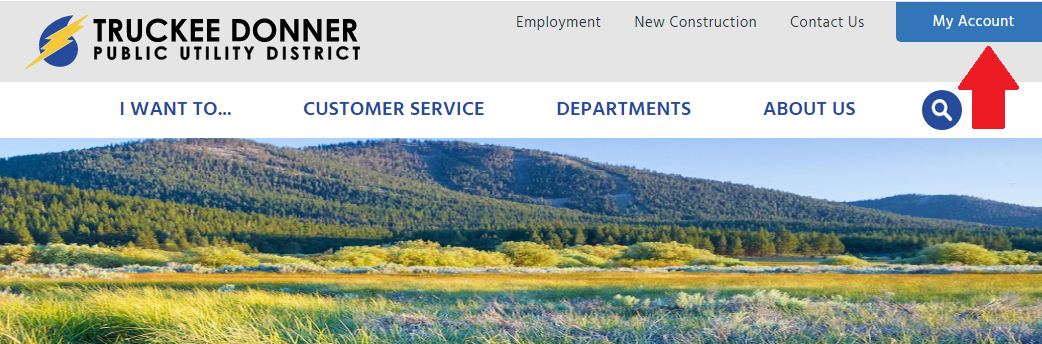
- Go to tdpud.org and click on the MyAccount button in the top right corner/ Vaya a tdpud.org y haga clic en el boton “My Account” en la esquina superior derecha
- Click the link for New Account/ Haga clic en el enlace para cuenta nueva
- To create a new account, enter your billing account number (found on your bill), your last name and your email address and hit submit/ Para crear una nueva cuenta, ingrese su numero de facturacion (que se encuentra en su factura), su apellido y su direccion de correo electronico y presionar enviar
- You will receive an email from TDPUD titled “SmartHub Registration” with the next step to finish setting up your account. Click the “Verify Account” button in the email and set your password to complete the registration process/ Recibira un correo electronico de TDPUD titulado “SmartHub Registration” con el siguiente paso para terminar de configurar su cuenta. Haga clic en el boton “Verify Account“ en el correo electronico y configure su contraseña para completer el proceso de registro


From the SmartHub app/ Desde la aplicacion SmartHub:
- Download the SmartHub app to your mobile device/ Descarga la aplicacion SmartHub en tu dispositivo movil
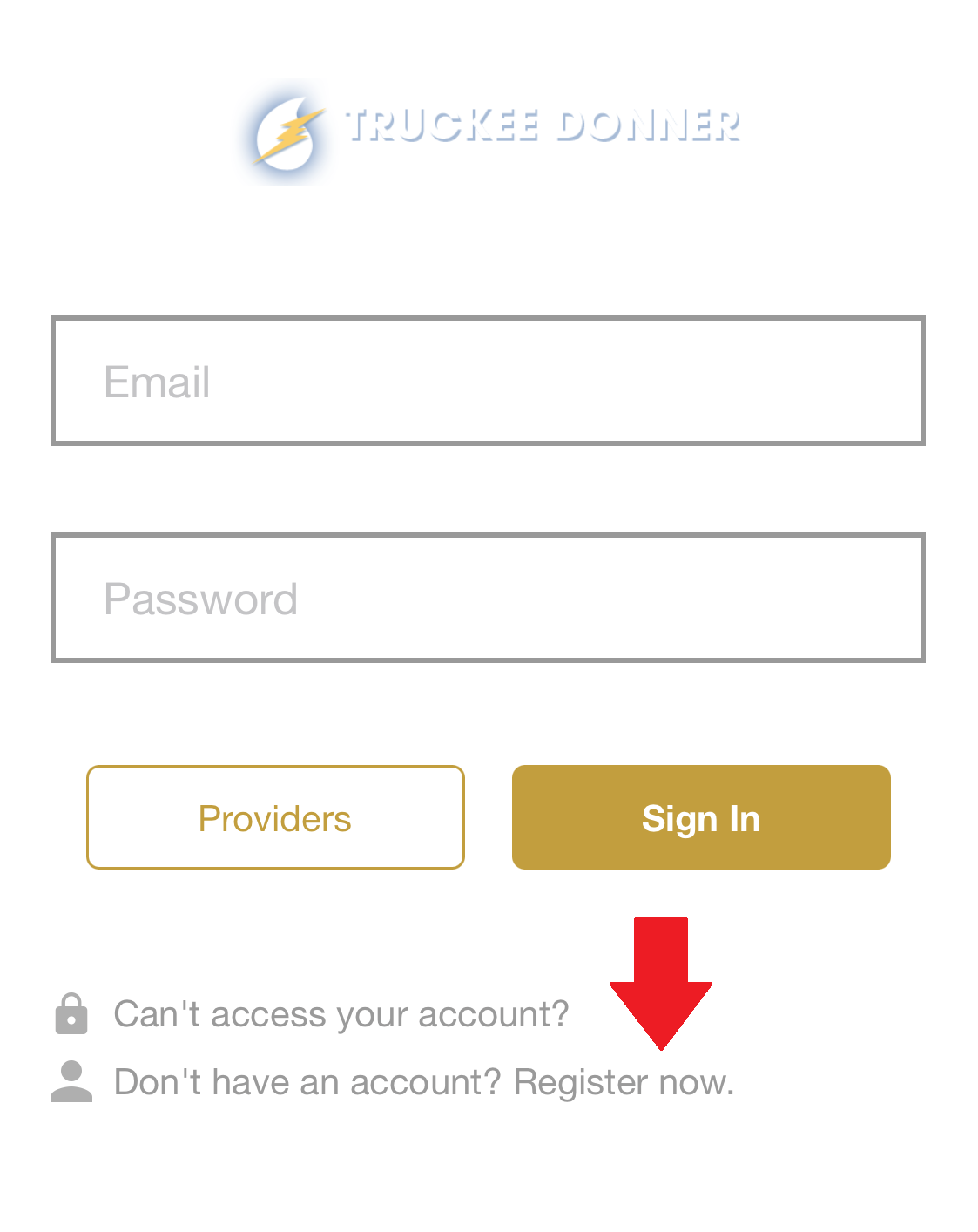
- Click the link labeled “Register Now”/ Haga clic en el enlace “Register Now“
- To create a new account, enter your billing account number (found on your bill), your last name and your email address and click Continue/ Para crear una nueva cuenta, ingrese su numero de cuenta de facturacion (que se encuentra en su factura), su apellido y su direccion de correo electronico y haga clic en Continue
- You will receive an email from TDPUD titled “SmartHub Registration” with the next step to finish setting up your account. Click the “Verify Account” button in the email and set your password to complete the registration process/ Recibira un correo electronico de TDPUD titulado “SmartHub Registration” con el siguiente paso para terminar de configurar su cuenta. Haga clic en el boton “Verify Account“ en el correo electronico y configure su contraseña para completer el proceso de registro