
SmartHub FAQ
Answers to common questions about SmartHub
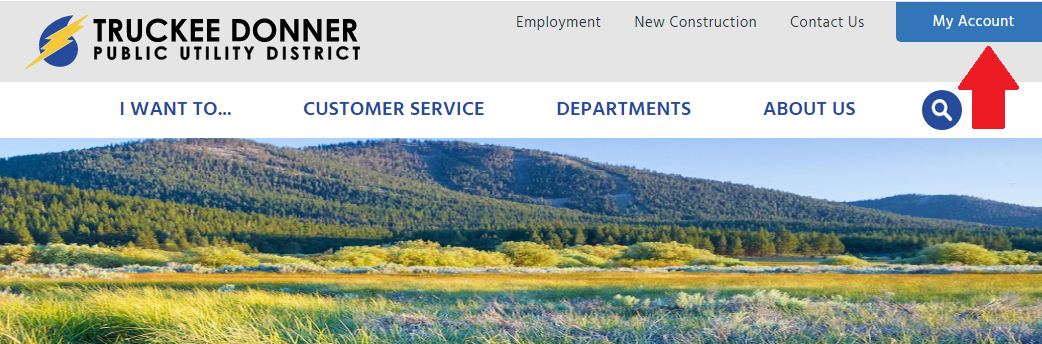
Click on the "My Account" link at the top right of this page and sign up as a new user. You will need your account number handy to sign up. You can also download the SmartHub app and create your account there.
Below are step-by-step instructions for how to sign up for a SmartHub account, either from the TDPUD homepage or from the SmartHub mobile app
A continuacion encontrara instrucciones paso a paso sobre como registrarse para obtener una cuenta de SmartHub, ya desde la pagina de inicio de TDPUD o desde la aplicacion movil de SmartHub
From the TDPUD website/ Desde el sitio web de TDPUD:
- Go to tdpud.org and click on the MyAccount button in the top right corner/ Vaya a tdpud.org y haga clic en el boton “My Account” en la esquina superior derecha
- Click the link for New Account/ Haga clic en el enlace para cuenta nueva
- To create a new account, enter your billing account number (found on your bill), your last name and your email address and hit submit/ Para crear una nueva cuenta, ingrese su numero de facturacion (que se encuentra en su factura), su apellido y su direccion de correo electronico y presionar enviar
- You will receive an email from TDPUD titled “SmartHub Registration” with the next step to finish setting up your account. Click the “Verify Account” button in the email and set your password to complete the registration process/ Recibira un correo electronico de TDPUD titulado “SmartHub Registration” con el siguiente paso para terminar de configurar su cuenta. Haga clic en el boton “Verify Account“ en el correo electronico y configure su contraseña para completer el proceso de registro


From the SmartHub app/ Desde la aplicacion SmartHub:
- Download the SmartHub app to your mobile device/ Descarga la aplicacion SmartHub en tu dispositivo movil
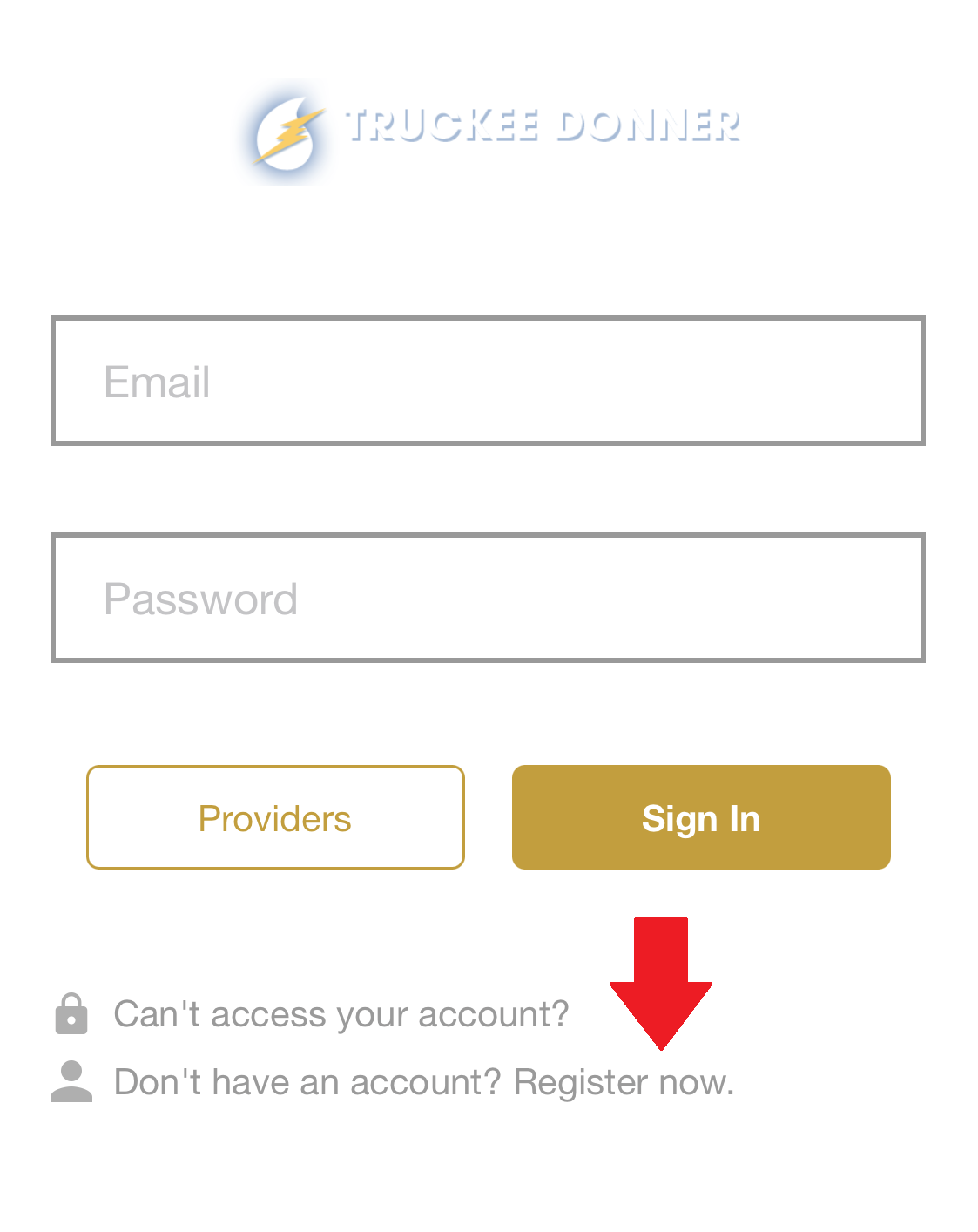
- Click the link labeled “Register Now”/ Haga clic en el enlace “Register Now“
- To create a new account, enter your billing account number (found on your bill), your last name and your email address and click Continue/ Para crear una nueva cuenta, ingrese su numero de cuenta de facturacion (que se encuentra en su factura), su apellido y su direccion de correo electronico y haga clic en Continue
- You will receive an email from TDPUD titled “SmartHub Registration” with the next step to finish setting up your account. Click the “Verify Account” button in the email and set your password to complete the registration process/ Recibira un correo electronico de TDPUD titulado “SmartHub Registration” con el siguiente paso para terminar de configurar su cuenta. Haga clic en el boton “Verify Account“ en el correo electronico y configure su contraseña para completer el proceso de registro


No. The SmartHub service is free.
Yes. The SmartHub app is supported on the following platforms:
- iOs 3.1 and above (iPhone and iPad)
- Android 2.1 and above (Smartphone or Table)
Yes. The SmartHub home page shows all of your accounts with the amounts due.
Tips for Navigating Your Online Account
Our online customer account management platform (SmartHub) has a new look and improved features. When you log in to your account, you’ll see that SmartHub now has easier-to-navigate menus, text that’s easier to read, and new usage alerts. These upgrades address customer feedback we’ve received about the platform. Here are some tips for how to navigate the new SmartHub platform.
Here is the home screen, where you’ll see notifications from TDPUD, and overviews of your account’s usage and billing status.

The navigation menu has moved to the left side of the screen. Previously, it was at the top of the screen. Here you can click to view your bill, make a payment, update your settings, and more.

Usage Explorer is the best way to investigate your account’s water and electric usage. Here you can view trends in your usage, down to the day.

Usage Tracking is a new tool you can use to analyze your usage for a specific timeframe. Set a timeframe for a time you want more information for (if you’re hosting a holiday or event or have visitors staying over your home, etc.) and you’ll be able to see how that timeframe deviates from your average usage.

To return to the homepage, click the TDPUD logo in the upper right-hand corner.

If you have any questions about how to navigate your online account, call or email our customer service department at 530-587-3896 or service@tdpud.org.